DePayLink — Accept crypto payments

Add a crypto payment option to the way you already sell. DePayLink lets you request SOL or USDC on Solana through a shareable checkout link, without taking custody of the payment.

Non-custodial · Solana mainnet · no card required

depaylink.com/dashboard/create

Create payment

What are you charging for?

Logo Design

Amount

250

Asset

USDCSOL

Receiving wallet

7xK…AbC

Start with customer readiness, not a long list of coins

Customers cannot pay a crypto request with a card or a bank balance alone. Before offering the option, establish whether they have a compatible Solana wallet, the supported asset and enough SOL to cover the network fee.

Offering too many unclear payment choices can create more support work than sales. A limited, accurately described option is easier to communicate: SOL or USDC, on Solana, paid to your receiving wallet.

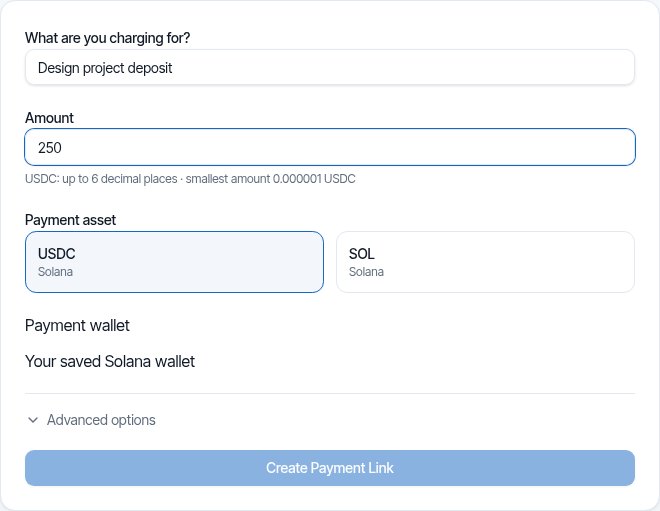
DePayLink dashboard: payment description, amount, SOL or USDC selection and saved Solana receiving wallet

Introduce crypto alongside your existing sales workflow

Agree the purchase with the customer first. Create a DePayLink request for the amount and asset, then send the checkout link in the order conversation or invoice. The page contains the payment instructions and QR checkout.

This does not require replacing your existing card provider or building an ecommerce integration. You can keep other payment options separate and offer a Solana request to customers who can use it. DePayLink verifies the transfer before marking the request paid.

HOW IT WORKS

From payment link to paid.

Create a link, send it to your customer, and let DePay verify the payment on Solana.

01

Create a payment link

Enter what you're charging, the amount, and where you want to get paid.

DePayDePay
Merchant

Create payment

Add the payment details below.

What are you charging for?

Logo Design

Amount

250

Asset

USDC ●

Receiving wallet

7xK...AbC
Create payment link

Funds go directly to your wallet.

02

Share it anywhere

Copy your payment link, share it directly, or use the QR code.

DePayDePay
Merchant

Payment link created

Your link is ready to send.

Payment

Logo Design

250 USDC

Ready to share
depaylink.com/pay/9f2c1a

Copy link

Share

QR code

Link ready

03

Your customer opens it

They open the link and see a simple checkout — no wallet connection required.

DePayDePay
Secure payment

Acme Design

Premium Logo Design

250 USDC

Solana

Payment destination

7xK...AbC
Pay 250 USDC
Scan QR
Copy details

No wallet connection required

04

Payment detected

DePay detects the transaction and checks it on Solana.

DePayDePay
Secure payment

Acme Design

250 USDC

Premium Logo Design

DETECTED

Payment detected

Checking on Solana

Transaction found
Amount matches
Asset matches
Checking destination...

Verifying payment

05

You're paid

Once everything matches, DePay marks the payment as confirmed.

DePayDePay
Secure payment

Payment confirmed

250 USDC

Logo Design

StatusPAID
NetworkSolana

Verified on Solana

Transaction confirmed

Accept Crypto Payments: built around your payment request

Clear supported choices

Choose between SOL and USDC on Solana. Tell customers the exact network rather than implying that any cryptocurrency can be sent.

Shareable online checkout

Use a dedicated payment page wherever the sale is agreed. Customers do not need a DePayLink account to open it.

Receipt in your wallet

Payments reach the selected Solana address directly. Your business decides how to store, convert and account for the assets afterwards.

THE CUSTOMER EXPERIENCE

Your customer just opens the link and pays.

No wallet connection. No account. No complicated setup.

DePayDePay
Secure payment

Acme Design

Premium Logo Design

250 USDC

Solana

Payment destination

7xK...Faq3xv2Mc...
Copy Address
Pay 250 USDC

No wallet connection required

01

NO WALLET CONNECTION

Open the link and pay.

02

NO ACCOUNT

Nothing to sign up for.

03

NO COMPLICATED SETUP

Just the payment details your customer needs.

OPEN LINKSEE PAYMENTPAY

Open the link. Pay. Done.

DePay independently verifies the payment on Solana — amount, asset and destination must match.

Three practical starting points

A customer asks to pay in crypto

Confirm the supported asset and network, agree the amount, and create a link for that order. Do not accept an unfamiliar token simply because it has a familiar name.

An online service appointment

Send the payment request with the booking details. Record the verified payment separately from the appointment and cancellation terms.

A social-commerce order

After confirming stock and delivery, send the link in the conversation. Payment verification does not automatically ship goods or resolve disputes.

Inside Pro

Everything Pro unlocks — preview the real experience before you pay a cent.

Advanced analytics

See volume, payment count and success rate over 7, 30 or 90 days.

Custom payment pages

Customers see your business, your description and exactly what to pay.

Custom branding

Set your logo, name, accent colour and thank-you message.

QR payments

A link QR to share (PNG or SVG), plus a wallet QR inside checkout.

Unlimited payment links

Free includes 5 links a month. Pro removes the limit.

Remove DePayLink branding

Hide the DePayLink watermark and social links from your payment pages.

Crypto changes the payment responsibilities

A blockchain transfer is not a card authorization and has no automatic card chargeback flow. Agree refund terms, verify payment before fulfilment and keep the transaction record. Your legal, tax and wallet-security obligations remain yours.

Questions about accept crypto payments

Which cryptocurrencies can I accept?

DePayLink supports SOL and USDC on Solana. It does not support Bitcoin, Ethereum-network payments or every token available in a customer’s wallet.

Do I have to stop accepting cards?

No. You can keep your existing payment methods and offer DePayLink separately for supported crypto requests. DePayLink itself does not process credit or debit cards.

Can customers buy crypto inside checkout?

DePayLink is not a card-to-crypto purchase service. Customers should already be able to send the requested asset on Solana before attempting the payment.

What should I do before delivering an order?

Check the verified payment status for the correct request, not just a screenshot or message. Keep order details and the transaction record together in your normal fulfilment process.

Does DePayLink handle my taxes?

No. You are responsible for recording receipts and any relevant valuations, conversions or disposals. Ask an accountant about the requirements in your jurisdiction.

Offer a clear crypto payment option

SOL and USDC on Solana. Direct to your wallet. Start with the Free plan.