DePayLink — Accept USDC payments

Request a specific amount in USDC on Solana and give your customer a clear payment page. DePayLink verifies the transfer while the funds go directly to your own wallet.

Non-custodial · Solana mainnet · no card required

depaylink.com/dashboard/create

Create payment

What are you charging for?

Logo Design

Amount

250

Asset

USDCSOL

Receiving wallet

7xK…AbC

USDC exists on more than one network

A customer saying “I have USDC” does not establish that they can pay a Solana request. USDC on Ethereum or another chain is not the same payment route. Network mismatches can leave a merchant unpaid even when the customer believes they sent the right token.

Stablecoin pricing can be useful for an agreed client bill or product price, but it still requires precise instructions. The amount, token and network must be clear before a transfer starts. USDC is designed to track the US dollar; it is not a bank deposit or a guarantee against all risk.

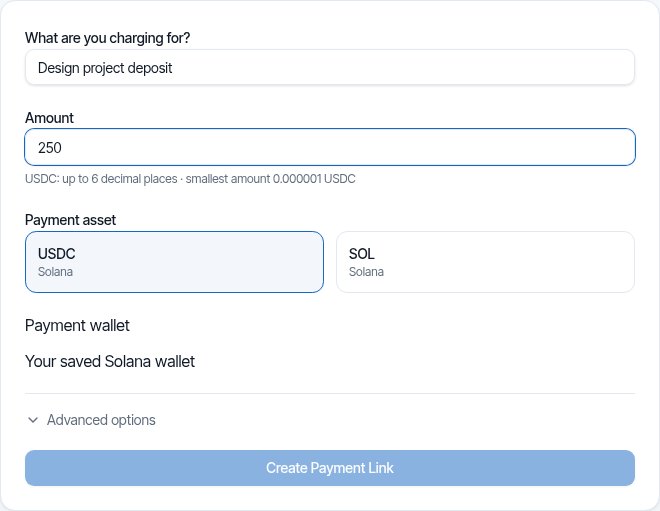
DePayLink dashboard: payment description, amount, SOL or USDC selection and saved Solana receiving wallet

A USDC request that names the network

Select USDC when creating your payment link. The customer sees the amount and Solana network on checkout, alongside the receiving details and QR code. Ask the customer to check both their asset and network before sending.

DePayLink checks for the supported USDC asset reaching the selected destination with the required amount and on-chain confirmation. A similarly named token or USDC sent on a different chain is not a valid payment for the request.

HOW IT WORKS

From payment link to paid.

Create a link, send it to your customer, and let DePay verify the payment on Solana.

01

Create a payment link

Enter what you're charging, the amount, and where you want to get paid.

DePayDePay
Merchant

Create payment

Add the payment details below.

What are you charging for?

Logo Design

Amount

250

Asset

USDC ●

Receiving wallet

7xK...AbC
Create payment link

Funds go directly to your wallet.

02

Share it anywhere

Copy your payment link, share it directly, or use the QR code.

DePayDePay
Merchant

Payment link created

Your link is ready to send.

Payment

Logo Design

250 USDC

Ready to share
depaylink.com/pay/9f2c1a

Copy link

Share

QR code

Link ready

03

Your customer opens it

They open the link and see a simple checkout — no wallet connection required.

DePayDePay
Secure payment

Acme Design

Premium Logo Design

250 USDC

Solana

Payment destination

7xK...AbC
Pay 250 USDC
Scan QR
Copy details

No wallet connection required

04

Payment detected

DePay detects the transaction and checks it on Solana.

DePayDePay
Secure payment

Acme Design

250 USDC

Premium Logo Design

DETECTED

Payment detected

Checking on Solana

Transaction found
Amount matches
Asset matches
Checking destination...

Verifying payment

05

You're paid

Once everything matches, DePay marks the payment as confirmed.

DePayDePay
Secure payment

Payment confirmed

250 USDC

Logo Design

StatusPAID
NetworkSolana

Verified on Solana

Transaction confirmed

Accept USDC Payments: built around your payment request

Amounts in USDC

State the amount the customer has agreed to pay, instead of recalculating a SOL price during a conversation. Keep any invoice currency and conversion policy explicit.

Solana-specific checkout

Give the customer payment instructions for the network DePayLink actually supports. There is no automatic bridge from another USDC network.

Direct receipt

The USDC reaches your receiving wallet without a DePayLink withdrawal step. Converting it to local currency is a separate workflow with your chosen provider.

THE CUSTOMER EXPERIENCE

Your customer just opens the link and pays.

No wallet connection. No account. No complicated setup.

DePayDePay
Secure payment

Acme Design

Premium Logo Design

250 USDC

Solana

Payment destination

7xK...Faq3xv2Mc...
Copy Address
Pay 250 USDC

No wallet connection required

01

NO WALLET CONNECTION

Open the link and pay.

02

NO ACCOUNT

Nothing to sign up for.

03

NO COMPLICATED SETUP

Just the payment details your customer needs.

OPEN LINKSEE PAYMENTPAY

Open the link. Pay. Done.

DePay independently verifies the payment on Solana — amount, asset and destination must match.

USDC in everyday payment requests

A fixed-price service

For an agreed 250 USDC service, create a link for 250 USDC and include it with the invoice. The checkout makes the asset and network visible to the client.

A cross-border project milestone

A client who already holds USDC on Solana can pay an agreed milestone directly. Keep the project reference and the transaction record together for reconciliation.

A digital order

Share a USDC request after agreeing the product and delivery method. DePayLink verifies payment; product delivery and refund decisions remain your responsibility.

Inside Pro

Everything Pro unlocks — preview the real experience before you pay a cent.

Advanced analytics

See volume, payment count and success rate over 7, 30 or 90 days.

Custom payment pages

Customers see your business, your description and exactly what to pay.

Custom branding

Set your logo, name, accent colour and thank-you message.

QR payments

A link QR to share (PNG or SVG), plus a wallet QR inside checkout.

Unlimited payment links

Free includes 5 links a month. Pro removes the limit.

Remove DePayLink branding

Hide the DePayLink watermark and social links from your payment pages.

Stablecoin does not mean risk-free

USDC has issuer, network and market risks. DePayLink does not insure balances, redeem USDC for dollars or handle a bridge. You remain responsible for wallet security, records, taxes and applicable obligations.

Questions about accept usdc payments

Can customers send USDC from Ethereum?

Not directly to a DePayLink Solana request. The customer must hold and send the supported USDC asset on Solana. If their funds are on another network, they need a separate supported transfer or conversion process before paying.

Does DePayLink convert USDC to my bank currency?

No. You receive USDC in your own Solana wallet. Any conversion or bank withdrawal happens through a separate service you choose, subject to its fees and verification requirements.

Does a customer need SOL as well as USDC?

A normal Solana transaction requires SOL for network fees, even when the transferred asset is USDC. Customers should check the fee requirements in their wallet before sending.

Is the requested amount automatically a dollar invoice?

No. A payment request denominated in USDC is not a tax invoice or an exchange-rate record. Your invoice should specify the agreed terms, and your accounting process should record the relevant local-currency value.

What happens if the wrong token is sent?

It should not count as the requested USDC payment. Blockchain transfers are not automatically reversible, so stop and inspect the transaction before asking the customer to send again.

Request your first USDC payment

SOL and USDC on Solana. Direct to your wallet. Start with the Free plan.