DePayLink — Crypto payment links

Turn a payment request into one shareable address. DePayLink brings the amount, asset, receiving wallet and payment status together, so your customer knows exactly what to send.

Non-custodial · Solana mainnet · no card required

depaylink.com/dashboard/create

Create payment

What are you charging for?

Logo Design

Amount

250

Asset

USDCSOL

Receiving wallet

7xK…AbC

A wallet address is not a complete payment request

Sending an address in a chat leaves important details scattered across messages: the price, the token, the network and which order the payment belongs to. A customer may copy the right address but send the wrong asset, or send you a screenshot before a transfer has been confirmed.

A payment link gives one request its own destination on the web. You can attach it to an invoice, a proposal or an order conversation without building a shopping cart. It is useful when you already agree the purchase with the customer and need a clear way to collect payment.

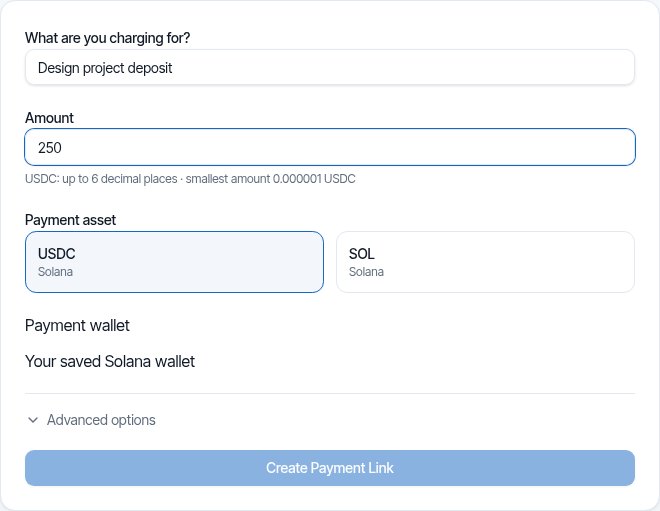
DePayLink dashboard: payment description, amount, SOL or USDC selection and saved Solana receiving wallet

One link, one clear request

Choose a description and amount, select SOL or USDC, and use your saved Solana receiving address. DePayLink creates a public payment page with the details and a QR-based checkout. You do not connect a wallet to create the link.

Your customer opens the page without creating a DePayLink account. They use a compatible Solana wallet to send the requested asset. The page waits for verification rather than asking you to accept a receipt image as proof.

HOW IT WORKS

From payment link to paid.

Create a link, send it to your customer, and let DePay verify the payment on Solana.

01

Create a payment link

Enter what you're charging, the amount, and where you want to get paid.

DePayDePay
Merchant

Create payment

Add the payment details below.

What are you charging for?

Logo Design

Amount

250

Asset

USDC ●

Receiving wallet

7xK...AbC
Create payment link

Funds go directly to your wallet.

02

Share it anywhere

Copy your payment link, share it directly, or use the QR code.

DePayDePay
Merchant

Payment link created

Your link is ready to send.

Payment

Logo Design

250 USDC

Ready to share
depaylink.com/pay/9f2c1a

Copy link

Share

QR code

Link ready

03

Your customer opens it

They open the link and see a simple checkout — no wallet connection required.

DePayDePay
Secure payment

Acme Design

Premium Logo Design

250 USDC

Solana

Payment destination

7xK...AbC
Pay 250 USDC
Scan QR
Copy details

No wallet connection required

04

Payment detected

DePay detects the transaction and checks it on Solana.

DePayDePay
Secure payment

Acme Design

250 USDC

Premium Logo Design

DETECTED

Payment detected

Checking on Solana

Transaction found
Amount matches
Asset matches
Checking destination...

Verifying payment

05

You're paid

Once everything matches, DePay marks the payment as confirmed.

DePayDePay
Secure payment

Payment confirmed

250 USDC

Logo Design

StatusPAID
NetworkSolana

Verified on Solana

Transaction confirmed

Crypto Payment Links: built around your payment request

Share where the order happens

Put the same payment link in an email, invoice, chat or social conversation. Customers receive a full payment request instead of a bare wallet address.

A checkout customers can inspect

The asset, amount and receiving details are visible before the customer pays. QR checkout provides another way to carry those details into a wallet.

A status tied to the request

On-chain checks match the transfer to the payment request. A copied link or a customer opening checkout is not itself a completed payment.

THE CUSTOMER EXPERIENCE

Your customer just opens the link and pays.

No wallet connection. No account. No complicated setup.

DePayDePay
Secure payment

Acme Design

Premium Logo Design

250 USDC

Solana

Payment destination

7xK...Faq3xv2Mc...
Copy Address
Pay 250 USDC

No wallet connection required

01

NO WALLET CONNECTION

Open the link and pay.

02

NO ACCOUNT

Nothing to sign up for.

03

NO COMPLICATED SETUP

Just the payment details your customer needs.

OPEN LINKSEE PAYMENTPAY

Open the link. Pay. Done.

DePay independently verifies the payment on Solana — amount, asset and destination must match.

Where a payment link fits

An order agreed in chat

After agreeing a product and its price, send a dedicated link for that order. Keep the conversation for delivery details and the link for the payment request.

A deposit on a proposal

Attach a link to the proposal for an agreed deposit. State the remaining balance and delivery terms separately; the payment link is not a contract or an invoice.

A QR at an appointment

Present the request as a QR code to a customer who already uses Solana. Confirm the verified payment before providing the service or handing over goods.

Inside Pro

Everything Pro unlocks — preview the real experience before you pay a cent.

Advanced analytics

See volume, payment count and success rate over 7, 30 or 90 days.

Custom payment pages

Customers see your business, your description and exactly what to pay.

Custom branding

Set your logo, name, accent colour and thank-you message.

QR payments

A link QR to share (PNG or SVG), plus a wallet QR inside checkout.

Unlimited payment links

Free includes 5 links a month. Pro removes the limit.

Remove DePayLink branding

Hide the DePayLink watermark and social links from your payment pages.

The link carries instructions, not custody

DePayLink does not hold the payment between you and your customer. The receiving wallet is yours, and a successful payment goes there directly. Check your saved address before creating a request and keep control of your own wallet keys.

Questions about crypto payment links

Do I need a website to use a payment link?

No. A DePayLink checkout has its own public URL. You can share it through channels you already use for sales, such as email or chat, without embedding a checkout on a separate website.

Is a payment link an invoice?

It is a payment request, not a replacement for a formal invoice. Add the link to your invoice and keep invoice numbers, customer details, terms and accounting records in your usual workflow.

Can a customer pay by card?

No. DePayLink accepts SOL and USDC on Solana, not credit or debit cards. A customer needs the requested cryptocurrency and a wallet capable of sending it on Solana.

Can I change where an existing link sends funds?

Existing links retain their receiving destination. Review the wallet when creating the request; changing or removing a saved wallet does not redirect earlier links.

Does sharing a link prove that I was paid?

No. Opening, copying or sharing the link is different from payment verification. Wait for the on-chain transfer to be verified for that payment request.

Make your next payment request a link

SOL and USDC on Solana. Direct to your wallet. Start with the Free plan.