DePayLink — Crypto payments for freelancers

Send a client one clear payment request for a deposit, milestone or completed project. DePayLink verifies SOL and USDC payments on Solana while you receive the funds directly.

Non-custodial · Solana mainnet · no card required

depaylink.com/dashboard/create

Create payment

What are you charging for?

Logo Design

Amount

250

Asset

USDCSOL

Receiving wallet

7xK…AbC

A client payment should not require chasing screenshots

Freelancers often agree work in a proposal and request payment by email. Sending a wallet address alone leaves the client to piece together the amount, asset and network, while a receipt screenshot still leaves you checking whether the right payment arrived.

International work also requires clear commercial terms. Agree what is being billed, which asset will be used and how any invoice-currency conversion is handled. A crypto payment link makes the request clearer; it does not replace a contract or settle an invoice dispute.

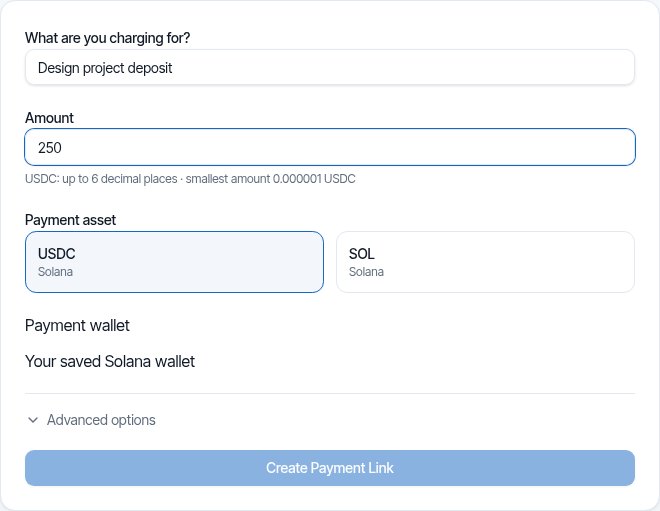
DePayLink dashboard: payment description, amount, SOL or USDC selection and saved Solana receiving wallet

Give every project payment a clear request

Add a descriptive payment link to the invoice or milestone email. Set the exact amount in SOL or USDC and select your receiving Solana wallet. Your client sees the network, destination and payment details without signing up for DePayLink.

The client uses a compatible wallet to send the funds. DePayLink checks the on-chain match before marking the request paid. Keep the transaction record with your project and accounting files instead of relying on the client’s message as proof.

HOW IT WORKS

From payment link to paid.

Create a link, send it to your customer, and let DePay verify the payment on Solana.

01

Create a payment link

Enter what you're charging, the amount, and where you want to get paid.

DePayDePay
Merchant

Create payment

Add the payment details below.

What are you charging for?

Logo Design

Amount

250

Asset

USDC ●

Receiving wallet

7xK...AbC
Create payment link

Funds go directly to your wallet.

02

Share it anywhere

Copy your payment link, share it directly, or use the QR code.

DePayDePay
Merchant

Payment link created

Your link is ready to send.

Payment

Logo Design

250 USDC

Ready to share
depaylink.com/pay/9f2c1a

Copy link

Share

QR code

Link ready

03

Your customer opens it

They open the link and see a simple checkout — no wallet connection required.

DePayDePay
Secure payment

Acme Design

Premium Logo Design

250 USDC

Solana

Payment destination

7xK...AbC
Pay 250 USDC
Scan QR
Copy details

No wallet connection required

04

Payment detected

DePay detects the transaction and checks it on Solana.

DePayDePay
Secure payment

Acme Design

250 USDC

Premium Logo Design

DETECTED

Payment detected

Checking on Solana

Transaction found
Amount matches
Asset matches
Checking destination...

Verifying payment

05

You're paid

Once everything matches, DePay marks the payment as confirmed.

DePayDePay
Secure payment

Payment confirmed

250 USDC

Logo Design

StatusPAID
NetworkSolana

Verified on Solana

Transaction confirmed

Payments for Freelancers: built around your payment request

Invoice-friendly links

Paste the payment URL into the invoice you already issue. Keep invoice number, scope, due date and legal terms in that document.

Separate milestone requests

Create a distinct request for an agreed deposit or project stage. This helps distinguish what was paid from work that has not yet been billed.

Your own receiving wallet

Client funds go directly to your selected Solana address, not to a freelancer marketplace balance held by DePayLink.

THE CUSTOMER EXPERIENCE

Your customer just opens the link and pays.

No wallet connection. No account. No complicated setup.

DePayDePay
Secure payment

Acme Design

Premium Logo Design

250 USDC

Solana

Payment destination

7xK...Faq3xv2Mc...
Copy Address
Pay 250 USDC

No wallet connection required

01

NO WALLET CONNECTION

Open the link and pay.

02

NO ACCOUNT

Nothing to sign up for.

03

NO COMPLICATED SETUP

Just the payment details your customer needs.

OPEN LINKSEE PAYMENTPAY

Open the link. Pay. Done.

DePay independently verifies the payment on Solana — amount, asset and destination must match.

Payment moments in independent work

A designer’s project deposit

A designer agrees a 250 USDC deposit and adds the request to the project invoice. The client must have USDC on Solana and enough SOL for the fee.

A developer’s completed milestone

After the client approves a deliverable, the developer sends a link for that milestone. Payment verification is separate from approval and project acceptance.

A consultant’s retainer

Send a request for an agreed billing period. A payment link is not an automatic recurring debit; issue subsequent requests according to your contract.

Inside Pro

Everything Pro unlocks — preview the real experience before you pay a cent.

Advanced analytics

See volume, payment count and success rate over 7, 30 or 90 days.

Custom payment pages

Customers see your business, your description and exactly what to pay.

Custom branding

Set your logo, name, accent colour and thank-you message.

QR payments

A link QR to share (PNG or SVG), plus a wallet QR inside checkout.

Unlimited payment links

Free includes 5 links a month. Pro removes the limit.

Remove DePayLink branding

Hide the DePayLink watermark and social links from your payment pages.

Protect both your wallet and the client relationship

Review receiving details before sharing a request. Explain that DePayLink does not process cards or automatically convert receipts to local currency. You remain responsible for wallet access, records, taxes, contractual terms and refunds.

Questions about payments for freelancers

Do clients need a DePayLink account?

No. They can open the public checkout and send from a compatible Solana wallet. They must already be able to pay the requested SOL or USDC asset on Solana.

Can I use the link with an existing invoice?

Yes. Add the payment URL or QR code to your invoice. The invoice should still contain the client details, reference, scope and terms required for your business.

Is a monthly retainer charged automatically?

No. A payment link requests a payment from the client; it does not authorize an automatic recurring debit. Agree each billing period and issue the appropriate request.

What if my invoice is in euros or dollars?

Agree the crypto amount or conversion policy with the client before creating the request. DePayLink does not automatically manage an invoice exchange rate or local-currency bank settlement.

Can I receive payment in any cryptocurrency?

No. These links support SOL and USDC on Solana. Confirm the client has the supported asset on the correct network before asking them to pay.

Send a clearer client payment request

SOL and USDC on Solana. Direct to your wallet. Start with the Free plan.