DePayLink — Crypto payments for small business

For orders agreed by chat, email or in person, a payment link can give your small business a clear crypto checkout without replacing the rest of your sales process.

Non-custodial · Solana mainnet · no card required

depaylink.com/dashboard/create

Create payment

What are you charging for?

Logo Design

Amount

250

Asset

USDCSOL

Receiving wallet

7xK…AbC

The payment is only one part of a small-business order

A shop or service business has to manage stock, appointments, delivery and customer expectations—not just collect money. A wallet transfer with no order context makes it harder to decide what to fulfil and how to reconcile the receipt.

Crypto is useful only when the customer can use the supported asset and network. Keep conventional payment options available through your existing providers, and introduce SOL or USDC as an explicit alternative rather than suggesting all customers can pay this way.

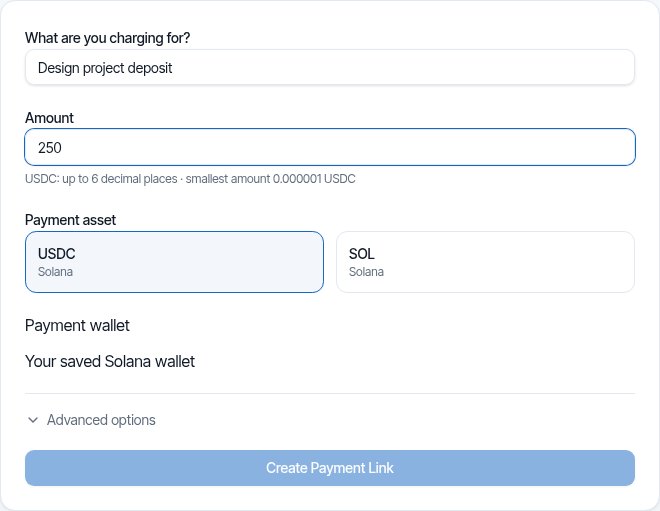
DePayLink dashboard: payment description, amount, SOL or USDC selection and saved Solana receiving wallet

Connect an agreed order to a specific payment request

Create a link with a description that helps you identify the order, the agreed amount and your Solana receiving wallet. Share it after confirming the order details. The customer gets clear checkout instructions and a QR option.

Wait for DePayLink’s on-chain verification before treating the request as paid. Your existing business tools remain responsible for invoicing, stock, booking and fulfilment. The link is a focused way to request and confirm supported crypto payments.

HOW IT WORKS

From payment link to paid.

Create a link, send it to your customer, and let DePay verify the payment on Solana.

01

Create a payment link

Enter what you're charging, the amount, and where you want to get paid.

DePayDePay
Merchant

Create payment

Add the payment details below.

What are you charging for?

Logo Design

Amount

250

Asset

USDC ●

Receiving wallet

7xK...AbC
Create payment link

Funds go directly to your wallet.

02

Share it anywhere

Copy your payment link, share it directly, or use the QR code.

DePayDePay
Merchant

Payment link created

Your link is ready to send.

Payment

Logo Design

250 USDC

Ready to share
depaylink.com/pay/9f2c1a

Copy link

Share

QR code

Link ready

03

Your customer opens it

They open the link and see a simple checkout — no wallet connection required.

DePayDePay
Secure payment

Acme Design

Premium Logo Design

250 USDC

Solana

Payment destination

7xK...AbC
Pay 250 USDC
Scan QR
Copy details

No wallet connection required

04

Payment detected

DePay detects the transaction and checks it on Solana.

DePayDePay
Secure payment

Acme Design

250 USDC

Premium Logo Design

DETECTED

Payment detected

Checking on Solana

Transaction found
Amount matches
Asset matches
Checking destination...

Verifying payment

05

You're paid

Once everything matches, DePay marks the payment as confirmed.

DePayDePay
Secure payment

Payment confirmed

250 USDC

Logo Design

StatusPAID
NetworkSolana

Verified on Solana

Transaction confirmed

Small Business Payments: built around your payment request

Works with manually agreed orders

Use links for orders already confirmed by phone, chat or email. There is no need to introduce a new cart just to request a supported crypto payment.

QR checkout for face-to-face sales

Present a QR payment request to a customer with a compatible Solana wallet. Verify the payment rather than accepting the customer’s screen as the only evidence.

A separate payment record

Keep the request description and transaction reference alongside your order records. Accounting and local-currency valuation remain in your bookkeeping process.

THE CUSTOMER EXPERIENCE

Your customer just opens the link and pays.

No wallet connection. No account. No complicated setup.

DePayDePay
Secure payment

Acme Design

Premium Logo Design

250 USDC

Solana

Payment destination

7xK...Faq3xv2Mc...
Copy Address
Pay 250 USDC

No wallet connection required

01

NO WALLET CONNECTION

Open the link and pay.

02

NO ACCOUNT

Nothing to sign up for.

03

NO COMPLICATED SETUP

Just the payment details your customer needs.

OPEN LINKSEE PAYMENTPAY

Open the link. Pay. Done.

DePay independently verifies the payment on Solana — amount, asset and destination must match.

Examples for owners and merchants

An order collected at a local shop

Confirm the items and total, then present the payment request. Hand over the order after verification and record it in the shop’s normal sales system.

A booking deposit

Attach a request to the booking confirmation. Explain cancellation and refund terms separately; payment verification does not manage appointment availability.

A made-to-order product

Agree the product specification and deposit, then send a dedicated link. Keep production milestones and any balance payment distinct in your order records.

Inside Pro

Everything Pro unlocks — preview the real experience before you pay a cent.

Advanced analytics

See volume, payment count and success rate over 7, 30 or 90 days.

Custom payment pages

Customers see your business, your description and exactly what to pay.

Custom branding

Set your logo, name, accent colour and thank-you message.

QR payments

A link QR to share (PNG or SVG), plus a wallet QR inside checkout.

Unlimited payment links

Free includes 5 links a month. Pro removes the limit.

Remove DePayLink branding

Hide the DePayLink watermark and social links from your payment pages.

Set a wallet and fulfilment policy

Decide who controls the receiving wallet, how receipts are reconciled and when goods or services are released. Direct wallet payments have no automatic card chargeback flow. Refunds, records, taxes and applicable compliance remain business responsibilities.

Questions about small business payments

Is this an inventory or booking system?

No. DePayLink handles payment requests and verification. Continue using your own process for inventory, bookings, deliveries and customer terms.

Can my business offer both cards and crypto?

Yes, through separate payment arrangements. DePayLink handles SOL and USDC on Solana, while your existing card provider handles any card payments.

Can I use a payment request in person?

Yes. A QR code gives a customer another way to access the payment details. They still need a compatible Solana wallet and must send the supported asset on the right network.

Should I deliver after seeing a customer screenshot?

Wait for verification of the actual payment request. A screenshot may describe a different transaction or a transfer that has not met the required conditions.

Does receiving USDC complete the bookkeeping?

No. Keep the invoice or order record, transaction reference and relevant valuation information. Your accountant can explain how to record the receipt under local rules.

Add a payment link to your next order

SOL and USDC on Solana. Direct to your wallet. Start with the Free plan.