DePayLink — Crypto payment verification

A screenshot is a claim, not a verified payment. DePayLink checks Solana transfers against the payment request before marking it paid, helping you distinguish a real receipt from a message about one.

Non-custodial · Solana mainnet · no card required

depaylink.com/dashboard/create

Create payment

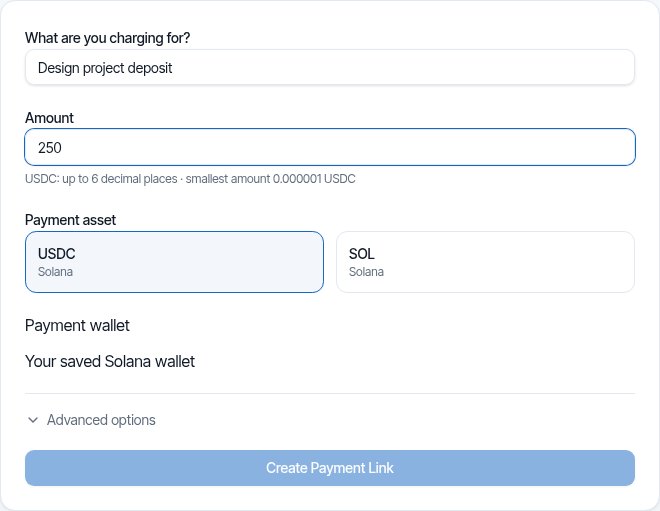
What are you charging for?

Logo Design

Amount

250

Asset

USDCSOL

Receiving wallet

7xK…AbC

A transaction can be real and still be the wrong payment

A customer may send a transaction screenshot that refers to another recipient, another token or an incomplete transfer. Even a real transaction signature does not prove that the requested amount reached your selected wallet for this request.

Manual checks are easy to rush when a customer is waiting for delivery. Verification needs to establish the asset, destination, amount and on-chain confirmation—not simply that a transaction exists or a wallet balance changed.

DePayLink dashboard: payment description, amount, SOL or USDC selection and saved Solana receiving wallet

Match the transfer to the request

DePayLink creates the payment request with a defined asset, amount and receiving destination. Its verification checks the Solana transaction against those details and the required on-chain confirmation before updating payment status.

Verification does not move the customer’s funds or hold them in an intermediate account. The payment reaches your wallet directly. Opening checkout, pressing a button or sending a screenshot cannot by itself produce a verified paid status.

HOW IT WORKS

From payment link to paid.

Create a link, send it to your customer, and let DePay verify the payment on Solana.

01

Create a payment link

Enter what you're charging, the amount, and where you want to get paid.

DePayDePay
Merchant

Create payment

Add the payment details below.

What are you charging for?

Logo Design

Amount

250

Asset

USDC ●

Receiving wallet

7xK...AbC
Create payment link

Funds go directly to your wallet.

02

Share it anywhere

Copy your payment link, share it directly, or use the QR code.

DePayDePay
Merchant

Payment link created

Your link is ready to send.

Payment

Logo Design

250 USDC

Ready to share
depaylink.com/pay/9f2c1a

Copy link

Share

QR code

Link ready

03

Your customer opens it

They open the link and see a simple checkout — no wallet connection required.

DePayDePay
Secure payment

Acme Design

Premium Logo Design

250 USDC

Solana

Payment destination

7xK...AbC
Pay 250 USDC
Scan QR
Copy details

No wallet connection required

04

Payment detected

DePay detects the transaction and checks it on Solana.

DePayDePay
Secure payment

Acme Design

250 USDC

Premium Logo Design

DETECTED

Payment detected

Checking on Solana

Transaction found
Amount matches
Asset matches
Checking destination...

Verifying payment

05

You're paid

Once everything matches, DePay marks the payment as confirmed.

DePayDePay
Secure payment

Payment confirmed

250 USDC

Logo Design

StatusPAID
NetworkSolana

Verified on Solana

Transaction confirmed

Payment Verification: built around your payment request

Asset and destination checks

SOL and the supported USDC asset are checked against the request’s selected receiving details. A similarly named token is not enough.

Amount validation

The transfer must satisfy the request’s amount conditions. A partial payment or unrelated balance movement is not equivalent to the expected receipt.

On-chain confirmation

A submitted transaction is different from a confirmed payment. DePayLink waits for its verification conditions before marking the request paid.

THE CUSTOMER EXPERIENCE

Your customer just opens the link and pays.

No wallet connection. No account. No complicated setup.

DePayDePay
Secure payment

Acme Design

Premium Logo Design

250 USDC

Solana

Payment destination

7xK...Faq3xv2Mc...
Copy Address
Pay 250 USDC

No wallet connection required

01

NO WALLET CONNECTION

Open the link and pay.

02

NO ACCOUNT

Nothing to sign up for.

03

NO COMPLICATED SETUP

Just the payment details your customer needs.

OPEN LINKSEE PAYMENTPAY

Open the link. Pay. Done.

DePay independently verifies the payment on Solana — amount, asset and destination must match.

Situations where verification matters

A screenshot before delivery

A seller receives an image claiming a payment was sent. The seller checks the request’s verified status rather than releasing the order based on the image.

USDC sent on a different network

The client reports a USDC transfer, but it was not on Solana. It is not a matching payment for the Solana request; inspect the transaction before sending again.

A transfer for a different amount

A customer sends less than requested or references another order. Check the payment request and transaction details instead of assuming any incoming transfer completes it.

Inside Pro

Everything Pro unlocks — preview the real experience before you pay a cent.

Advanced analytics

See volume, payment count and success rate over 7, 30 or 90 days.

Custom payment pages

Customers see your business, your description and exactly what to pay.

Custom branding

Set your logo, name, accent colour and thank-you message.

QR payments

A link QR to share (PNG or SVG), plus a wallet QR inside checkout.

Unlimited payment links

Free includes 5 links a month. Pro removes the limit.

Remove DePayLink branding

Hide the DePayLink watermark and social links from your payment pages.

Verification is not a guarantee of every business outcome

A verified transfer establishes the payment conditions, not customer identity, contractual acceptance or the safety of a product delivery. Network delays can affect confirmation. Do not ask for a duplicate payment simply because a status has not updated yet; inspect the transaction first.

Questions about payment verification

Is a transaction signature enough to prove payment?

Not by itself. It identifies a transaction that must be checked for the requested asset, amount, receiving destination and confirmation. A signature for another transfer is not proof that this request was paid.

What if checkout is still waiting?

Check the network, asset, receiving address and transaction status. A submitted transfer may not yet satisfy confirmation or matching requirements. Investigate before asking the customer to send a second payment.

Does a screenshot count as verification?

No. Screenshots can be incomplete, edited or refer to a different transaction. DePayLink uses on-chain checks rather than accepting an image as a paid status.

Does verification require DePayLink to hold the payment?

No. The transfer goes directly to your receiving wallet. Verification observes and checks the on-chain payment rather than taking custody of the funds.

Does this support every blockchain transaction?

No. DePayLink verifies its supported SOL and USDC payment requests on Solana. Transactions on other networks are not supported payments for these requests.

Request payment with on-chain verification

SOL and USDC on Solana. Direct to your wallet. Start with the Free plan.