DePayLink — Accept SOL payments

Create a payment request denominated in SOL for customers who already use Solana. DePayLink makes the amount and destination clear, then verifies the transfer to your wallet.

Non-custodial · Solana mainnet · no card required

depaylink.com/dashboard/create

Create payment

What are you charging for?

Logo Design

Amount

250

Asset

USDCSOL

Receiving wallet

7xK…AbC

A SOL price needs an agreed amount

SOL is Solana’s native asset and its market price can change. An invoice quoted in local currency and a payment request quoted in SOL are not automatically interchangeable. Agree the SOL amount and any quote terms before sending a request.

A customer also needs enough SOL to pay both the requested amount and the network fee. Sending the entire available wallet balance may fail or leave the customer unable to pay the transaction fee.

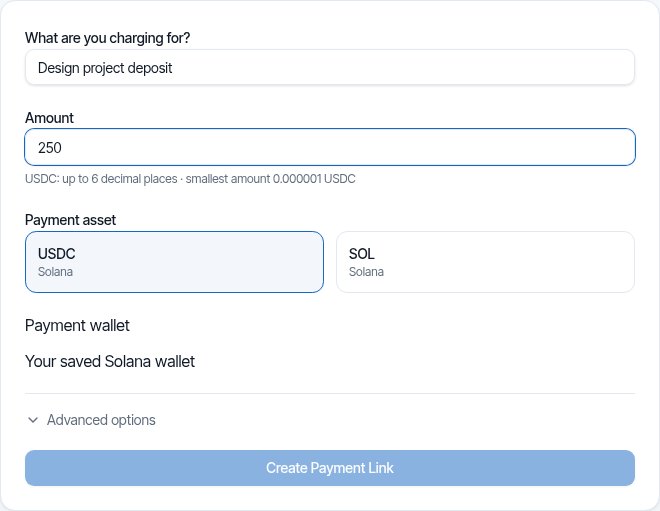
DePayLink dashboard: payment description, amount, SOL or USDC selection and saved Solana receiving wallet

Keep the request explicit in SOL

Choose SOL in the creation form and set the exact requested amount. DePayLink gives the customer a Solana checkout with the receiving details, link and QR code. The customer sends from a compatible wallet without registering with DePayLink.

The requested amount is not automatically converted when SOL’s market price changes. If you need a revised quote, agree it with the customer and create the appropriate request rather than treating a price movement as a change to an existing payment.

HOW IT WORKS

From payment link to paid.

Create a link, send it to your customer, and let DePay verify the payment on Solana.

01

Create a payment link

Enter what you're charging, the amount, and where you want to get paid.

DePayDePay
Merchant

Create payment

Add the payment details below.

What are you charging for?

Logo Design

Amount

250

Asset

USDC ●

Receiving wallet

7xK...AbC
Create payment link

Funds go directly to your wallet.

02

Share it anywhere

Copy your payment link, share it directly, or use the QR code.

DePayDePay
Merchant

Payment link created

Your link is ready to send.

Payment

Logo Design

250 USDC

Ready to share
depaylink.com/pay/9f2c1a

Copy link

Share

QR code

Link ready

03

Your customer opens it

They open the link and see a simple checkout — no wallet connection required.

DePayDePay
Secure payment

Acme Design

Premium Logo Design

250 USDC

Solana

Payment destination

7xK...AbC
Pay 250 USDC
Scan QR
Copy details

No wallet connection required

04

Payment detected

DePay detects the transaction and checks it on Solana.

DePayDePay
Secure payment

Acme Design

250 USDC

Premium Logo Design

DETECTED

Payment detected

Checking on Solana

Transaction found
Amount matches
Asset matches
Checking destination...

Verifying payment

05

You're paid

Once everything matches, DePay marks the payment as confirmed.

DePayDePay
Secure payment

Payment confirmed

250 USDC

Logo Design

StatusPAID
NetworkSolana

Verified on Solana

Transaction confirmed

Accept SOL Payments: built around your payment request

Native Solana payment

Request SOL directly rather than requiring the customer to acquire a different asset for the order.

A defined amount

The checkout shows what must be sent. Use the supported decimal precision in the creation form instead of rounding casually in a message.

Transfer checks

DePayLink verifies the requested SOL transfer against the receiving address and payment conditions, not a wallet screenshot.

THE CUSTOMER EXPERIENCE

Your customer just opens the link and pays.

No wallet connection. No account. No complicated setup.

DePayDePay
Secure payment

Acme Design

Premium Logo Design

250 USDC

Solana

Payment destination

7xK...Faq3xv2Mc...
Copy Address
Pay 250 USDC

No wallet connection required

01

NO WALLET CONNECTION

Open the link and pay.

02

NO ACCOUNT

Nothing to sign up for.

03

NO COMPLICATED SETUP

Just the payment details your customer needs.

OPEN LINKSEE PAYMENTPAY

Open the link. Pay. Done.

DePay independently verifies the payment on Solana — amount, asset and destination must match.

When SOL is the agreed payment asset

A Solana-native customer

A customer with SOL can pay a quoted service directly. Confirm the SOL price at the time of agreement and explain any expiry terms in your invoice or proposal.

A one-off digital purchase

Create a dedicated request for an agreed digital item. Keep the delivery process separate and wait for verification before releasing it.

A service at an event

Present a SOL payment request as a QR code. The payer still needs a compatible wallet and sufficient balance for both the payment and network fee.

Inside Pro

Everything Pro unlocks — preview the real experience before you pay a cent.

Advanced analytics

See volume, payment count and success rate over 7, 30 or 90 days.

Custom payment pages

Customers see your business, your description and exactly what to pay.

Custom branding

Set your logo, name, accent colour and thank-you message.

QR payments

A link QR to share (PNG or SVG), plus a wallet QR inside checkout.

Unlimited payment links

Free includes 5 links a month. Pro removes the limit.

Remove DePayLink branding

Hide the DePayLink watermark and social links from your payment pages.

Receiving SOL includes price exposure

The market value of SOL can rise or fall after receipt. DePayLink does not lock an exchange rate, hedge balances or convert them to fiat. Keep payment-time records and manage the asset according to your business policy.

Questions about accept sol payments

Is SOL the same as USDC on Solana?

No. SOL is the network’s native asset with a market price that changes. USDC is a separate dollar-linked token. A request for one must not be paid with the other.

Will the SOL amount change with the market?

No. The payment request uses the amount you enter. DePayLink does not automatically update an existing SOL request when a local-currency exchange rate changes.

Can a customer send their entire SOL balance?

They need to allow for the Solana transaction fee as well as the requested amount. The wallet should show the fee before sending; leaving no fee balance can prevent a payment.

Can I receive SOL from another network?

The payment must be on Solana. A wrapped or similarly named asset on another blockchain is not the native SOL transfer required by this request.

How should I record a SOL payment?

Keep the agreed amount, request reference, receipt time and transaction record. Your accountant can advise how to record local-currency valuation and any later sale or conversion.

Create a payment request in SOL

SOL and USDC on Solana. Direct to your wallet. Start with the Free plan.